> ## Documentation Index
> Fetch the complete documentation index at: https://docs.consensus.app/llms.txt
> Use this file to discover all available pages before exploring further.
# Get started with Consensus MCP
> The Consensus MCP server enables AI assistants like ChatGPT, Claude, Gemini Spark, and other MCP-compatible clients to search over 400 million peer-reviewed academic research papers directly from the conversation.
Consensus MCP lets AI assistants search 400+ million peer-reviewed research papers. Connect your preferred client below. You'll be searching in under 2 minutes
MCP is the fastest way to give an assistant or agent paper search. Owkin plugged Consensus MCP into its agentic AI scientist and went from curated PubMed abstracts to 25x the paper coverage in days. Browse the use cases.
**Server URL**
```text theme={null}
https://mcp.consensus.app/mcp
```
Add Consensus from the Claude connectors directory.
Add Consensus from the ChatGPT app directory.
Add Consensus for Copilot from the Microsoft Marketplace.
## Connect Your Client
**One-click:** open [Consensus in the Claude directory](https://claude.ai/directory/65247229-f0c7-49df-9044-fcbb8b3894c6) and click **Connect**. Or connect manually:
Open [claude.ai](https://claude.ai) or the Claude desktop app and go to **Settings**.
Select **Connectors**, then **Browse connectors**.
Search for **Consensus** and click **Connect**.
Approve the sign-in with your Consensus account, or continue without one at reduced limits.
Ask a research question in any chat. Consensus appears in the tools menu.
```bash theme={null}
claude mcp add --transport http consensus https://mcp.consensus.app/mcp
```
OAuth will open in your browser automatically on first use. You can also trigger it manually with the `/mcp` command inside Claude Code.
**One-click:** open [Consensus in the ChatGPT app directory](https://chatgpt.com/plugins/plugin_asdk_app_6943e6f4a928819195962de16fb9ffe4) and click **Connect**. Or connect manually:
Open [chatgpt.com](https://chatgpt.com) and sign in.
Open **Apps** from the sidebar, search for **Consensus**, and click **Connect**.
Sign in with your Consensus account when prompted.
Ask a research question, or call it by name: "Use Consensus to find RCTs on…"
Search results display in an interactive widget showing top papers with citations and direct links.
Consensus also works with ChatGPT Deep Research. See [Using Consensus with ChatGPT Deep Research](#using-consensus-with-chatgpt-deep-research) below.
```bash theme={null}
codex mcp add consensus --url https://mcp.consensus.app/mcp
codex mcp login consensus
```
Or add to `~/.codex/config.toml`:
```toml theme={null}
[mcp_servers.consensus]
url = "https://mcp.consensus.app/mcp"
```
**One-click:** [Install in Cursor](https://cursor.com/en/install-mcp?name=consensus\&config=eyJ1cmwiOiJodHRwczovL21jcC5jb25zZW5zdXMuYXBwL21jcCJ9). Or add to `~/.cursor/mcp.json`:
```json theme={null}
{
"mcpServers": {
"consensus": {
"command": "npx",
"args": ["-y", "mcp-remote@latest", "https://mcp.consensus.app/mcp"]
}
}
}
```
Add to your MCP configuration:
```json theme={null}
{
"servers": {
"consensus": {
"url": "https://mcp.consensus.app/mcp"
}
}
}
```
Add to your MCP configuration:
```json theme={null}
{
"mcpServers": {
"consensus": {
"serverUrl": "https://mcp.consensus.app/mcp"
}
}
}
```
Add Consensus as a custom app for Gemini Spark:
Go to [gemini.google.com](https://gemini.google.com) and sign in with a personal Google Account, then click **Settings & help** → **Connected Apps**.
Under **Custom apps for Spark**, click **Add a custom app** and paste the server URL:
```text theme={null}
https://mcp.consensus.app/mcp
```
Click **Next** and follow the prompts to finish OAuth. If your client doesn't support Dynamic Client Registration, expand **Advanced features** and enter your credentials.
Ask Gemini Spark a research question and it can call Consensus tools.
Requires access to Gemini Spark, a personal Google Account, Keep Activity turned on, and is currently available in the US. Workspace and school accounts are not supported yet.
In Microsoft 365 Copilot, Consensus is a connector your admin sets up for the tenant. Once it's there, connect it yourself under **Sources**.
In Microsoft 365 Copilot, select the **gear icon** at the bottom of the left sidebar, then **Settings**, then **Sources**.
Find **Consensus for Copilot** and select **Connect**, then sign in with your Consensus account.
Type a research question like 'What does the research say about creatine and cognitive function?' and Copilot will call Consensus to find relevant papers.
Don't see Consensus under Sources? Your admin needs to add it first. Send them the [Microsoft 365 Copilot admin guide](/enterprise/microsoft-365-copilot). A [Consensus account](https://consensus.app/sign-up) is required and free to create.
This allows you to add Consensus as a custom tool in Copilot studio so it can be used with agents or other automations you have have. This type of authentication will
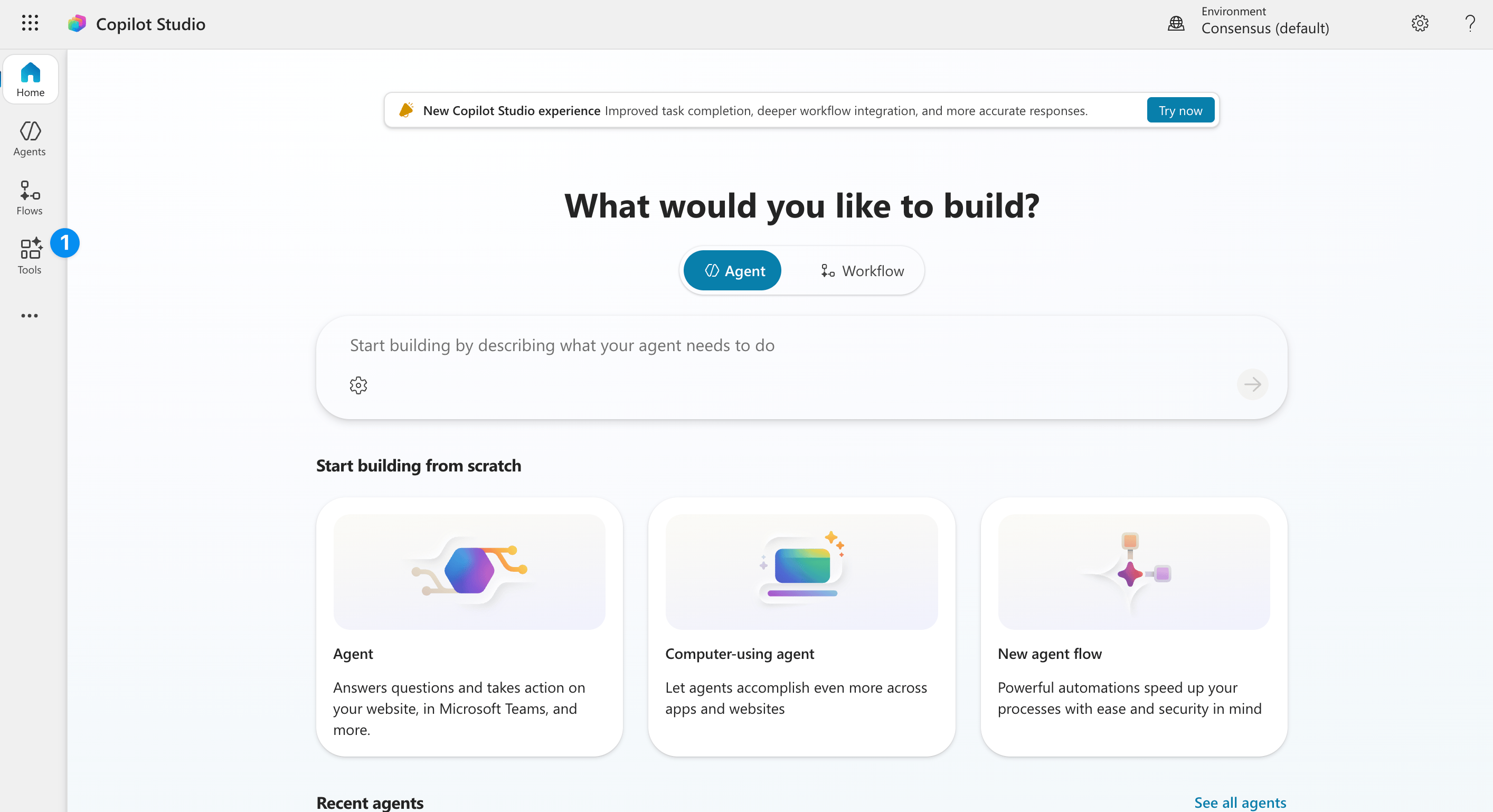
Go to Copilot studio and find the 'tools' tab on the left hand side.
Click 'new tool' to add a custom tool
You can also use the API to do this. But to use the MCP, click 'model context protocol'.
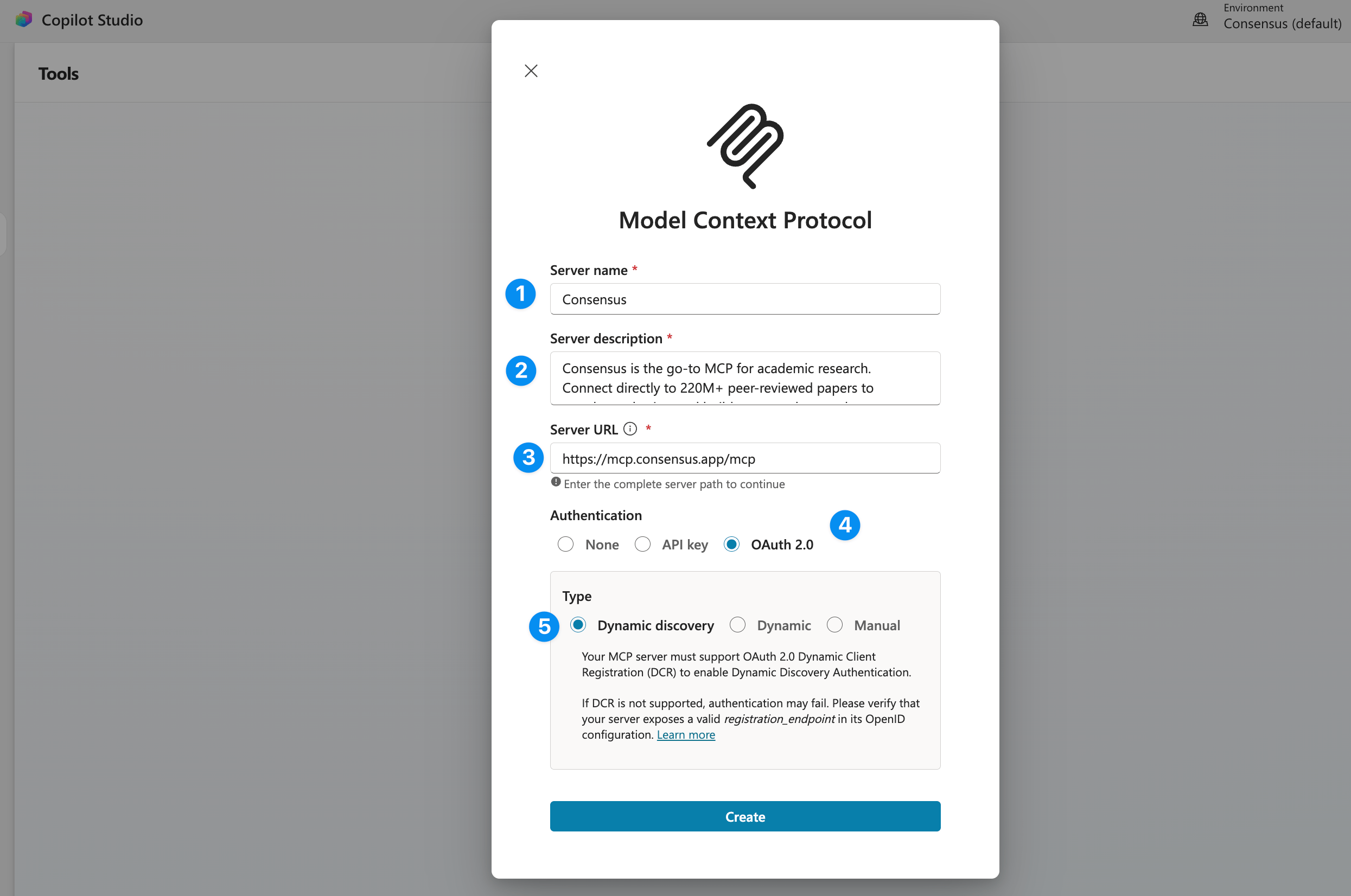
**Server name**
Consensus
**Server Description**
Consensus is the go-to MCP for academic research. Search 400M+ peer-reviewed papers from PubMed, Semantic Scholar, and ArXiv — filter by study type (RCTs, meta-analyses, systematic reviews), journal quality, sample size, and more. Get structured results with citations, study takeaways, and direct links, or run pre-built workflows for literature reviews, grant research, and evidence synthesis.
**Server URL**
[https://mcp.consensus.app/mcp](https://mcp.consensus.app/mcp)
**Authentication**
OAuth 2.0
**Type**
Dynamic Discovery
Thats it! This custom tool can now be used and shared with other team members. Each team member will be able to connect to their own Consensus account when they use the tool.
A [Consensus account](https://consensus.app/sign-up) is required. It is free to create.
Use an API key for clients without OAuth, headless agents, and server-side automations. Send it in the `Authorization` header on every request to `https://mcp.consensus.app/mcp`:
```http theme={null}
Authorization: Bearer YOUR_API_KEY
```
Create a key from your profile icon under **API & MCP Dashboard** → **Keys and clients** → **New key**. The key gets its owner's plan limits and draws from the same monthly pool as the API. See [MCP plans and access](/mcp-plans-and-access).
**JSON config** (Cursor, VS Code, and most clients that accept headers):
```json theme={null}
{
"mcpServers": {
"consensus": {
"url": "https://mcp.consensus.app/mcp",
"headers": {
"Authorization": "Bearer YOUR_API_KEY"
}
}
}
}
```
**Claude Code:**
```bash theme={null}
claude mcp add --transport http consensus https://mcp.consensus.app/mcp --header "Authorization: Bearer $CONSENSUS_API_KEY"
```
An invalid or revoked key fails the search with a tool error: "Your API key is invalid or expired." Create a new key from the **API & MCP Dashboard** and update your client config.
Keep the key server-side. Don't paste it into prompts or commit it to a repo.
Any client that supports remote MCP servers (Streamable HTTP) works. Point it at `https://mcp.consensus.app/mcp`. If your client supports OAuth, authentication is handled automatically.
Pick your client for step-by-step setup.
## Using Consensus with ChatGPT Deep Research
Consensus also works with ChatGPT Deep Research. When Deep Research uses the Consensus app, it can search Consensus for relevant papers and retrieve full paper details for cited results.
Connect the Consensus app in ChatGPT using the steps above.
Start a Deep Research request in ChatGPT.
Ask ChatGPT to use Consensus for peer-reviewed research, for example:
> Use Consensus to research the evidence on exercise for depression. Prioritize systematic reviews, meta-analyses, and randomized controlled trials.
Deep Research may run multiple Consensus searches, refine filters, retrieve paper details, and return a cited synthesis with direct links to papers on Consensus.
## Verify Your Connection
Try one of these in your connected client. Each link opens the question pre-filled:
| Ask | Try it |
| - | - |
| "What does the research say about creatine and cognitive function?" | [Claude](https://claude.ai/new?q=What%20does%20the%20research%20say%20about%20creatine%20and%20cognitive%20function%3F) · [ChatGPT](https://chatgpt.com/?q=What%20does%20the%20research%20say%20about%20creatine%20and%20cognitive%20function%3F) |
| "Find meta-analyses on mindfulness for anxiety published since 2020" | [Claude](https://claude.ai/new?q=Find%20meta-analyses%20on%20mindfulness%20for%20anxiety%20published%20since%202020) · [ChatGPT](https://chatgpt.com/?q=Find%20meta-analyses%20on%20mindfulness%20for%20anxiety%20published%20since%202020) |
| "Are there RCTs on intermittent fasting with more than 500 participants?" | [Claude](https://claude.ai/new?q=Are%20there%20RCTs%20on%20intermittent%20fasting%20with%20more%20than%20500%20participants%3F) · [ChatGPT](https://chatgpt.com/?q=Are%20there%20RCTs%20on%20intermittent%20fasting%20with%20more%20than%20500%20participants%3F) |
| "What is the strongest evidence for and against remote work productivity?" | [Claude](https://claude.ai/new?q=What%20is%20the%20strongest%20evidence%20for%20and%20against%20remote%20work%20productivity%3F) · [ChatGPT](https://chatgpt.com/?q=What%20is%20the%20strongest%20evidence%20for%20and%20against%20remote%20work%20productivity%3F) |
You should see results citing specific papers with titles, journals, years, citation counts, and direct links.
## Plans and Access
Your Consensus plan, not your AI subscription, sets how many papers each search returns, your monthly calls, and whether results include DOIs and full-text excerpts. No account is needed to try it.
Limits for every plan, how calls are counted, additional usage, and API key access.
## Search Tool
The search tool searches Consensus for peer-reviewed research papers. ChatGPT Deep Research may call this tool multiple times with different queries and filters while building a research report.
### Parameters
| Parameter | Type | Required | Description |
| - | - | - | - |
| query | string | Yes | The research question or topic to search for. Use specific academic terminology for best results. |
| year\_min | integer | No | Exclude papers published before this year. |
| year\_max | integer | No | Exclude papers published after this year. |
| study\_types | string array | No | Filter by study design. Values: rct, meta-analysis, systematic review, literature review, case report, non-rct experimental, non-rct observational study, non-rct in vitro, animal. |
| sjr\_max | integer | No | Filter by journal quality (SCImago Journal Rank quartile). 1 is Q1 (highest), 2 is Q2, 3 is Q3, 4 is Q4. |
| sjr\_min | integer | No | Minimum journal ranking quartile. 1 is Q1 (highest), 4 is Q4. Excludes better (lower-number) quartiles; for example, set to 2 to keep Q2–Q4. |
| human | boolean | No | Set to true to include only studies involving human subjects. |
| controlled | boolean | No | Set to true to include only controlled studies. |
| sample\_size\_min | integer | No | Exclude studies with sample sizes smaller than this number. |
| citation\_min | integer | No | Exclude papers with fewer citations than this number. |
| medical\_mode | boolean | No | Set to true for clinical, medical, or evidence-based medicine questions. Prioritizes top medical journals and clinical guidelines. |
| exclude\_preprints | boolean | No | Set to true to exclude preprints and return peer-reviewed papers only. |
| open\_access | boolean | No | Set to true to include only open-access papers. |
| duration\_min | integer | No | Minimum study duration in days. Useful for longitudinal or long-term studies. |
| duration\_max | integer | No | Maximum study duration in days. |
| country | string | No | Comma-separated ISO 3166-1 alpha-2 country codes (for example `us`, `gb`) to limit to those countries of study. Unknown codes are ignored. |
| month\_min | integer | No | Minimum publication month (1–12). Use with `year_min`. |
| month\_max | integer | No | Maximum publication month (1–12). Use with `year_max`. |
| publisher\_name | string | No | Comma-separated publisher names, for example `Elsevier`. |
| journal\_name | string | No | Preferred journal, for example `Nature`. Boosts matching papers without excluding others. |
| domain | string | No | Comma-separated academic field codes, for example `med` or `bio,cs`. |
| page | integer | No | Zero-indexed result page. Pages after the first need a paid plan. |
| page\_size | integer | No | Results per page. Defaults to 20, capped by your plan. |
| include\_full\_text\_chunks | boolean | No | Set to true to include query-relevant full-text excerpts. Paid plans only. |
### Response
The search tool returns a text payload containing ranked papers (title, link, authors, year, citation count, journal, and abstract), citation instructions, and any instructions for best rendering practices — everything an agent needs to answer with cited, linked sources.
```text theme={null}
Found 20 papers, showing top 20.
[1] [Caffeine and endurance performance: a meta-analysis](https://consensus.app/papers/details/3f1c.../?utm_source=claude_code) (Smith et al., 2021, 154 citations, Sports Medicine, DOI: 10.1007/s40279-021-01470-1)
Abstract text...
[2] ...
IMPORTANT INSTRUCTIONS: When discussing these findings, you MUST cite papers inline using their numbered references, e.g. [1], [2]. ...
```
Paid plans also get DOIs and, with `include_full_text_chunks`, full-text excerpts. In ChatGPT, results appear in the Consensus widget.
Need structured JSON? Use the [Consensus API](/api-get-started), which shares your monthly allowance with MCP.
### Example Prompts
* "What does the research say about the effectiveness of remote work on productivity?"
* "Find RCTs and meta-analyses since 2020 on cognitive behavioral therapy for anxiety"
* "Search for high quality human studies on gut microbiome and mental health with at least 100 participants"
* "Recent research on large language model hallucination from top tier journals"
* "Use Consensus Deep Research to compare evidence for different treatments for insomnia"
## Troubleshooting
You added the server with `-- --transport http` instead of `--url`. Remove and re-add:
```bash theme={null}
codex mcp remove consensus
codex mcp add consensus --url https://mcp.consensus.app/mcp
codex mcp login consensus
```
Fully quit and restart Claude Code. Do not just use the reconnect option. Your credentials are saved and will work after restart.
Your OAuth token has expired. Re-authenticate:
* **Claude Code:** Type `/mcp`, select Consensus, choose Clear authentication, re-authenticate, then restart Claude Code
* **Codex:** Run `codex mcp logout consensus` then `codex mcp login consensus`
* **Cursor:** Disconnect and reconnect the server in Settings then Tools and MCP
* **Claude Desktop:** Disconnect and reconnect the connector in Settings then Connectors
* **ChatGPT:** Disconnect and reconnect the Consensus app from ChatGPT Apps
* Verify the URL includes `/mcp` at the end
* Remove and re-add the server using the commands above
* Restart your client completely
This is normal. Claude loads tool definitions on demand when many tools are present. Retry the query and it will work on the second attempt.
Confirm the Consensus app is connected in ChatGPT Apps, then ask Deep Research to use Consensus explicitly. For example:
> Use Consensus to find peer-reviewed papers on this question and cite the strongest evidence.
Deep Research decides when to call connected tools, so it may not call Consensus for questions that are not research-focused.
Try broadening your search query or removing filters. Use specific academic terminology rather than casual language.
Paid plans can continue making calls past the included monthly limit when the account has an active metered API subscription and additional usage is enabled; extra usage is billed at \$0.05 per call, with each call covering up to 100 papers. Free plans must wait for the next monthly reset or upgrade.
Rate limits are per user for authenticated MCP clients. A 429 that says you're sending requests too quickly is a per-minute rate limit; wait a few moments and add backoff between requests. A 429 that mentions monthly call credits is a usage limit, not a rate limit.
## Security
* **Endpoint:** Only connect to the official URL: `https://mcp.consensus.app/mcp`
* **API keys:** Store securely using environment variables. Never share keys in prompts or public conversations. Rotate if compromised.
* **Data handling:** Search queries are sent to the Consensus API over HTTPS/TLS. Results contain publicly available academic paper metadata. No personal data is stored from MCP requests.
## Supported Platforms
| Platform | Auth | Status |
| - | - | - |
| Claude Desktop | OAuth | Supported |
| ChatGPT | OAuth | Supported |
| ChatGPT Deep Research | OAuth | Supported |
| Claude Code | OAuth | Supported |
| Codex | OAuth | Supported |
| Cursor | OAuth | Supported |
| VS Code (GitHub Copilot) | Config | Supported |
| Windsurf | Config | Supported |
| Gemini Spark | OAuth | Supported |
| Other MCP Clients | Bearer token | Supported |
## Additional Resources
Explore the Consensus research platform.
Structured JSON results for pipelines and integrations.
Learn more about the Model Context Protocol.
View the source, report issues, and star the Consensus MCP server.
This documentation is built and hosted on [Mintlify](https://mintlify.com), a developer documentation platform.
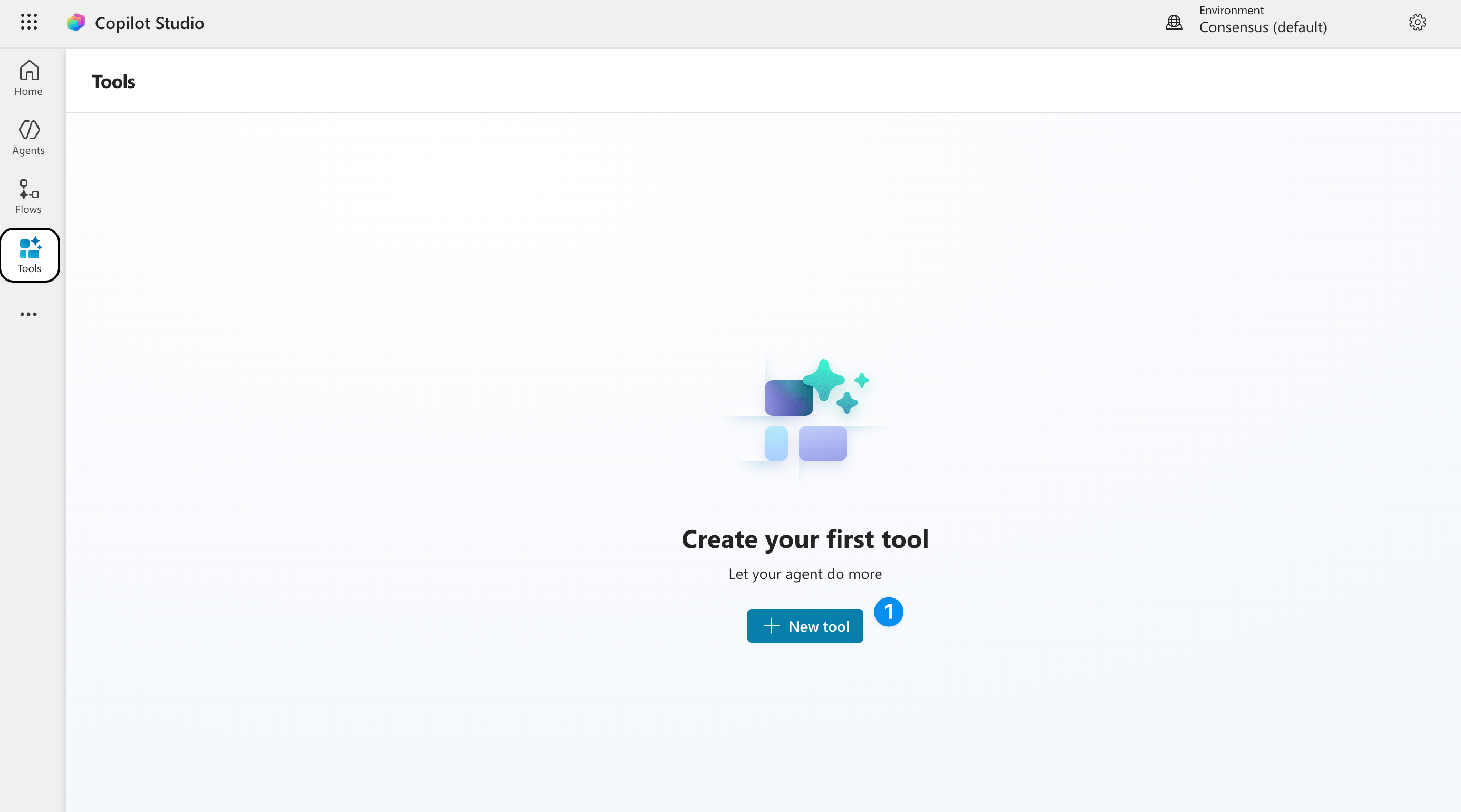 Click 'new tool' to add a custom tool
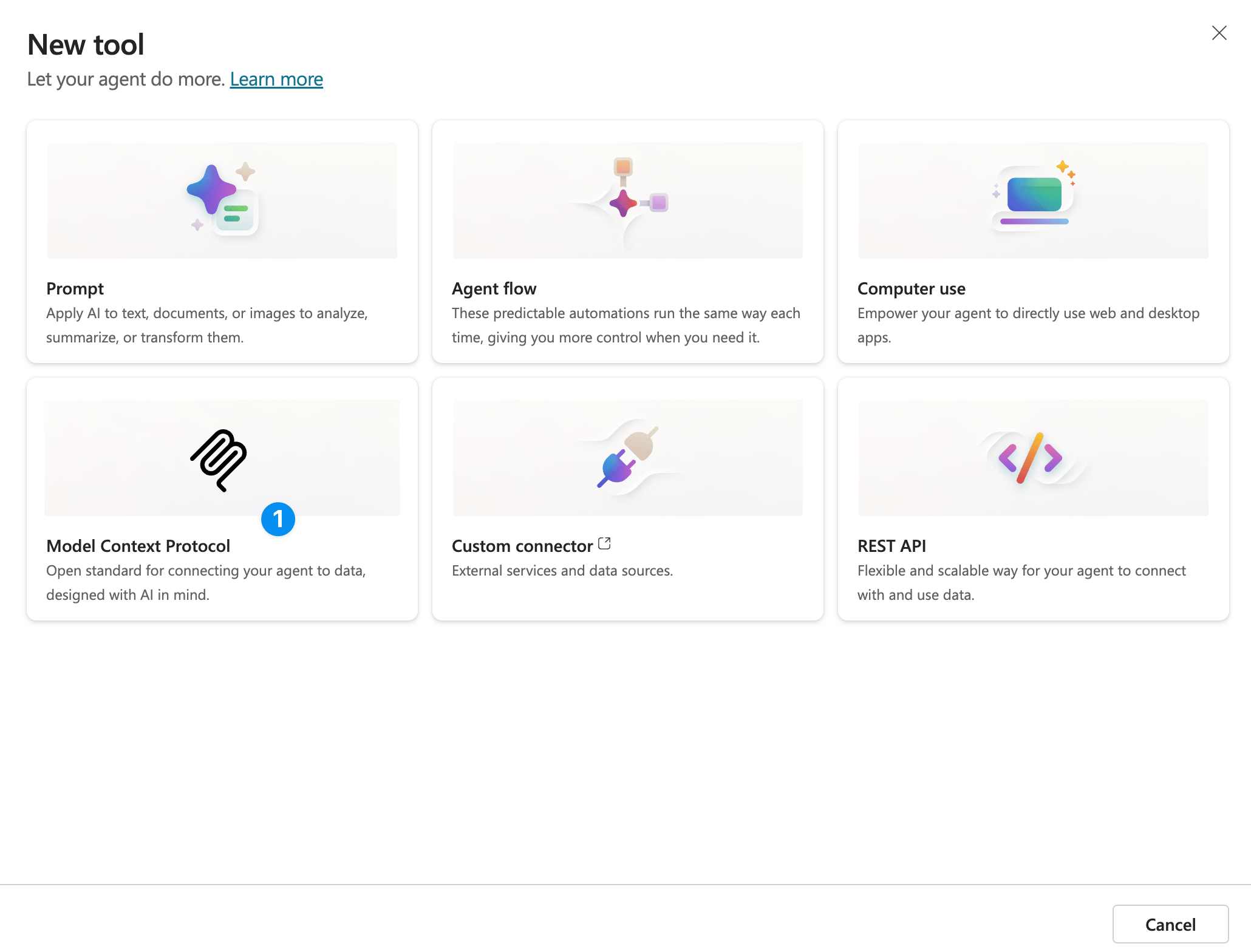 You can also use the API to do this. But to use the MCP, click 'model context protocol'.
 **Server name**
Consensus
**Server Description**
Consensus is the go-to MCP for academic research. Search 400M+ peer-reviewed papers from PubMed, Semantic Scholar, and ArXiv — filter by study type (RCTs, meta-analyses, systematic reviews), journal quality, sample size, and more. Get structured results with citations, study takeaways, and direct links, or run pre-built workflows for literature reviews, grant research, and evidence synthesis.
**Server URL**
[https://mcp.consensus.app/mcp](https://mcp.consensus.app/mcp)
**Authentication**
OAuth 2.0
**Type**
Dynamic Discovery
**Server name**
Consensus
**Server Description**
Consensus is the go-to MCP for academic research. Search 400M+ peer-reviewed papers from PubMed, Semantic Scholar, and ArXiv — filter by study type (RCTs, meta-analyses, systematic reviews), journal quality, sample size, and more. Get structured results with citations, study takeaways, and direct links, or run pre-built workflows for literature reviews, grant research, and evidence synthesis.
**Server URL**
[https://mcp.consensus.app/mcp](https://mcp.consensus.app/mcp)
**Authentication**
OAuth 2.0
**Type**
Dynamic Discovery